MT5 Trade Panel: the structure read on the chart you trade
Updated 2026-10-12
The Trade Panel is an Expert Advisor for MetaTrader 5 (and MT4) that shows the Market Lens read on your own chart: the 1-hour bias, the nearest zone and whether price is at it, the structure stop beyond the flip level, and a lot size worked out from your balance and risk %. You decide everything; nothing is placed until you click Yes.
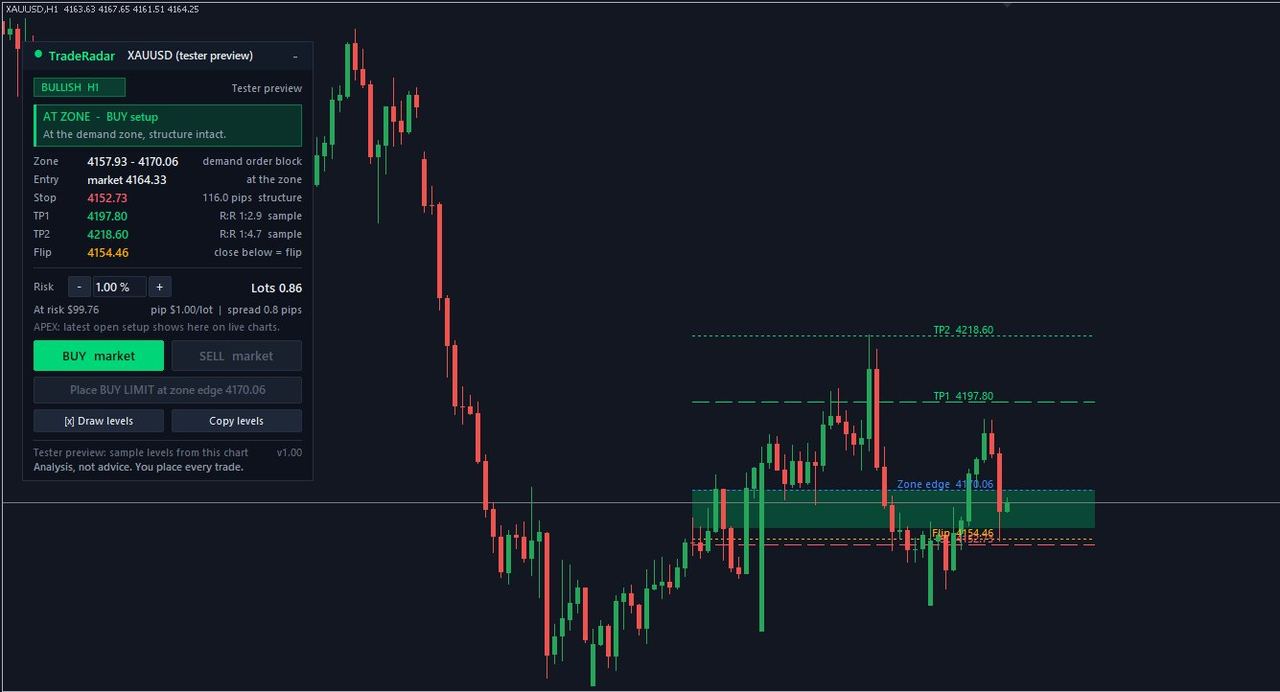
What the panel shows
- Bias and structure: the H1 structure with the higher-timeframe context.
- Zone status: green when price is at the zone with structure intact, amber when it is approaching (with the distance), grey when the structure has flipped or there is nothing to watch.
- Risk and lot size: set your risk % with − and +; the lot size comes from your balance, the structure stop and your broker's tick value and lot limits, capped by your free margin.
- At risk: the amount in your account currency if the stop is hit.
You stay in control
Every button opens a Yes / No box inside MetaTrader with the full order. Nothing is placed until you click Yes. TradeRadar never sends orders to the panel: there is no auto-trading and no copy trading. It is a tool you operate, not a trade recommendation.
Plans
Free: the full panel on today's #1 market and on your one free market unlock a day; other markets show bias and status only. Pro (R49 for your first week, then R449/month): all markets. The lot-size calculator works on any symbol with your own stop.
How to install the TradeRadar Trade Panel on MT5
- Create a free account. Sign up at gettraderadar.com and open Settings → Connections to copy your Connection key and download the MT5 kit.
- Copy the panel into MetaTrader. In MT5: File → Open Data Folder, copy TradeRadarPanel.ex5 into MQL5\Experts, then refresh the Navigator.
- Allow WebRequest. Tools → Options → Expert Advisors: tick "Allow WebRequest for listed URL" and add https://api.gettraderadar.com.
- Attach it to the chart you trade. Drag TradeRadarPanel onto your chart, paste the Connection key in Inputs, tick Allow Algo Trading and turn Algo Trading on.
- Set your risk %. Use − and + on the panel; the lot size and the amount at risk update from your balance and the structure stop.
Frequently asked questions
Does the Trade Panel trade automatically?
No. It shows the structure and a lot size, and only places an order after you click Yes in MetaTrader's own confirmation box. TradeRadar never sends orders to it.
Does it work on MT4?
Yes, there is an MT4 version (TradeRadarPanel.ex4) with the same layout.
Is the Trade Panel free?
Yes on today's #1 market and your daily free unlock. Pro opens every market.
My broker calls gold "GOLD" or "XAUUSD.m". Does it work?
Yes: set SymbolOverride in the panel's inputs to the TradeRadar name (XAUUSD, NAS100 and so on).
Related
Go further with TradeRadar
Free account
Today's #1 market read in full, one more market of your choice every day, and the 06:30 "top 5 to watch" email. No card.
Market Lens, live
The interactive chart with every zone, BOS/CHoCH, liquidity and premium/discount drawn on H1, H4, D1 and W1 for 26+ markets, refreshed every 15 minutes.
Open Market LensTrade Panel for MT5
The same structure read on the chart you trade in MetaTrader 5 or 4, with a lot size from your risk %. Nothing is placed without your Yes.
See the Trade Panel