A trading journal that fills itself from MT5
Updated 2026-10-12
Most traders stop journaling after a week because typing every trade is tedious. The TradeRadar journal reads your closed trades from MetaTrader automatically and points out the habits behind your results, so the journal keeps itself up to date and you only add the notes that matter.
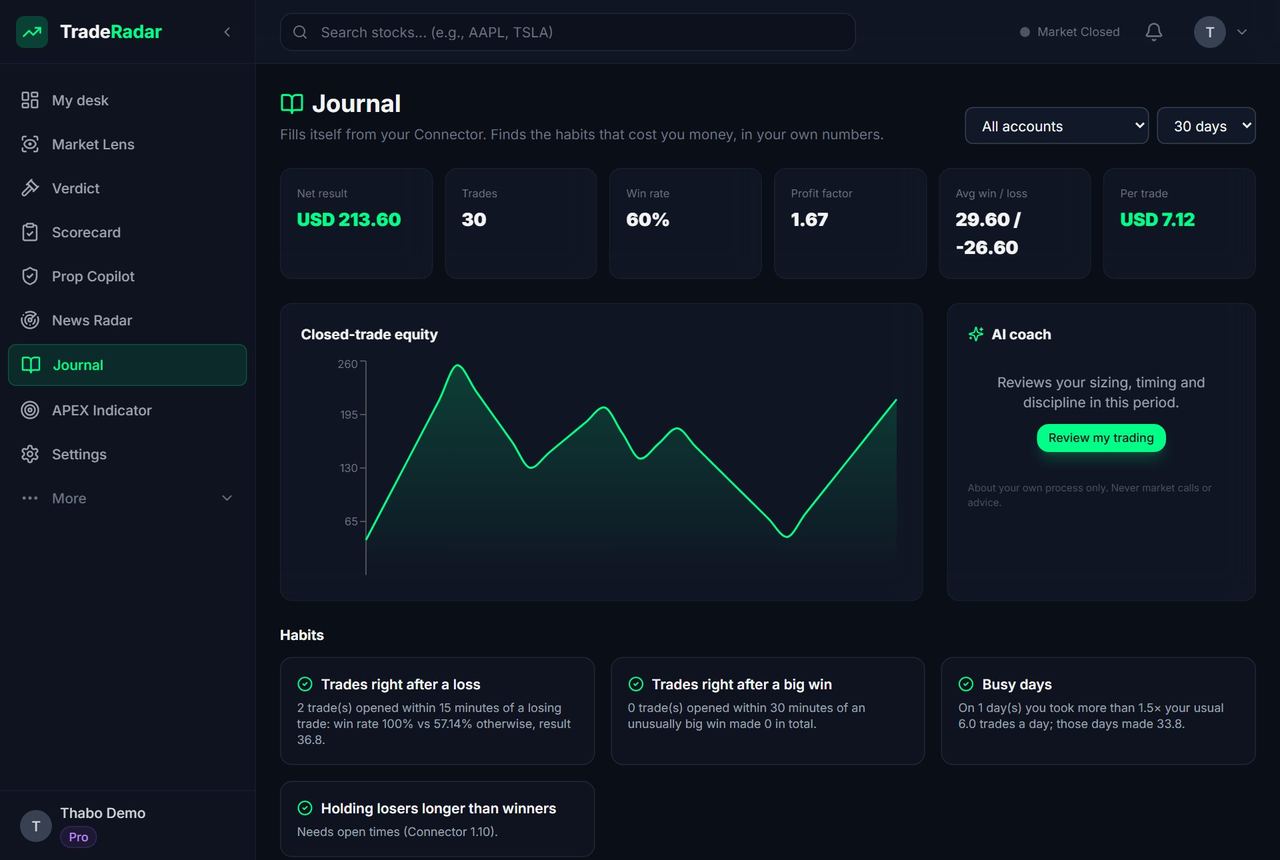
What it records
- Every closed trade from your MT5 or MT4 account: symbol, side, size, entry, exit, result and duration.
- Your equity curve and the stats per symbol and per session.
- Habit flags: oversizing compared with your usual risk, trading straight after a loss, holding losers longer than winners.
- Your own notes and tags on any trade.
Read-only and private
The connection uses the TradeRadar Connector in your own terminal with a Connection key. It only reads the account: no broker password and no trading. Your trades are not shared or ranked anywhere.
Built for prop challenges
The same connection powers Prop Copilot, which tracks your daily and maximum loss room on FTMO, FundedNext, The5%ers and other challenges and warns you before a limit is hit. See the prop firm rules comparison.
How to connect your MT5 account to the TradeRadar journal
- Create a free account. Sign up with Google or email at gettraderadar.com.
- Copy your Connection key. Settings → Connections → Connect a new account: pick MT5 or MT4 and copy the key.
- Install the Connector. Copy TradeRadarConnector into MQL5\Experts (File → Open Data Folder), allow WebRequest for https://api.gettraderadar.com and attach it to its own chart with the key.
- Trade as usual. Closed trades appear in the journal within a minute. On MT4, set Account History to All History.
Frequently asked questions
Is the trading journal free?
Yes. The journal and habit flags are free; the AI coach that comments on your journal is part of the paid plans.
Do I need to give my broker password?
No. The Connector runs inside your own MetaTrader terminal and only reads the account.
Does it work with prop firm accounts?
Yes. Connect the challenge terminal and add the account in Prop Copilot to track the daily and max loss rules as well.
Does it work on a phone?
The journal is a web app you can install on Android or iPhone. The Connector itself runs in MT5 or MT4 on a computer or VPS.
Related
Go further with TradeRadar
Free account
Today's #1 market read in full, one more market of your choice every day, and the 06:30 "top 5 to watch" email. No card.
Market Lens, live
The interactive chart with every zone, BOS/CHoCH, liquidity and premium/discount drawn on H1, H4, D1 and W1 for 26+ markets, refreshed every 15 minutes.
Open Market LensTrade Panel for MT5
The same structure read on the chart you trade in MetaTrader 5 or 4, with a lot size from your risk %. Nothing is placed without your Yes.
See the Trade Panel